.webp)
Battlefield 6 Aimbot & ESP — Undetected BF6 Cheats
Dominate Conquest and Breakthrough with precision aimbot, full infantry and vehicle ESP, real-time radar, and RCS — tuned for the scale and chaos of Battlefield 6.

Battlefield 6
Premium Undetected Battlefield 6 Hacks
Engineered to Win.
Precision coded for maximum performance. Our features are designed from the ground up to give you an undeniable mechanical advantage while maintaining absolute security.
Aim Control
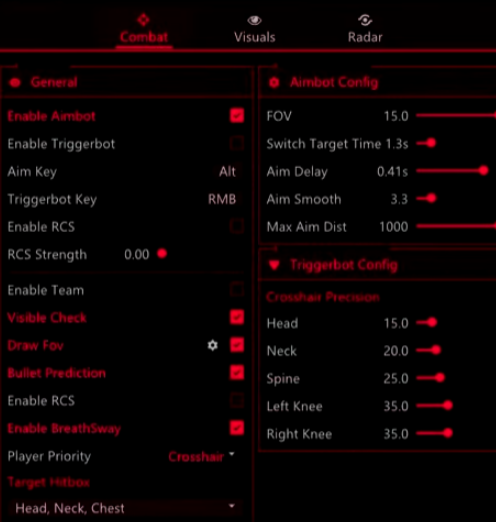
Tune aimbot, smoothing, delay, switch target time, max aim distance, visible check, draw FOV, prediction, RCS, and breath sway.
Player ESP
Read infantry pressure with player boxes, visible checks, filled visuals, health, names, distance, skeletons, and max-distance controls.
Vehicle ESP
Track vehicle pressure more clearly so infantry, armor, and squad rotations are easier to judge around large objective fights.
Radar Tools
Use radar, player radar, and vehicle radar to keep nearby threats easier to understand without relying only on direct visuals.
Advanced Play Mechanics
Dive deep into the mechanics of our software to understand exactly why we dominate the market.
Battlefield 6 cheats built for large-scale fights and objective pressure
Battlefield 6 aimbot, ESP, radar, and triggerbot from GS23 are designed around what makes BF6 different from every other shooter — combined arms, large objective maps, infantry-vehicle interplay, and fights that shift in seconds. The full feature set covers aimbot with FOV, smoothing, delay, prediction, RCS, and breath sway; triggerbot with bone precision; player and vehicle ESP; player and vehicle radar; and save/load config support. Runs on Windows 10 and Windows 11, supports Intel and AMD CPUs, works across Steam and Epic versions, and covers Windowed and Borderless modes.
Battlefield 6 hacks should match the pace of the game — not turn it into a twitch arena. The GS23 product gives you the information and aim control to read objective lanes, survive armor pressure, and push sectors with confidence rather than grinding through constant information gaps.
Aimbot: full control over feel, distance, and prediction
The GS23 Battlefield 6 aimbot gives you smoothing, delay, switch target time, max aim distance, visible check, draw FOV, bullet prediction, RCS, breath sway, player priority, and a curve editor. That range of settings matters because BF6 fights look nothing alike — a close corridor clear, a mid-range flag push, and a long lane hold all need different aim behavior.
FOV, smoothing, and delay
Draw FOV shows you the active aim zone while tuning so you know exactly what range the aimbot covers. Narrow FOV keeps assistance tight to where your crosshair already sits — controlled and hard to distinguish from natural play. Smoothing shapes how the aim travels; higher smoothing feels like practiced tracking, lower smoothing feels more immediate. Delay and switch target time prevent abrupt snapping between targets in multi-enemy angles.
Bullet prediction, RCS, and breath sway
Battlefield 6 targets sprint, slide, dive, and shift direction constantly. Bullet prediction accounts for that movement across range, keeping aim aligned through strafes and pushes instead of lagging behind fast movement. RCS flattens weapon kick without zeroing out all recoil — the result feels like better muscle memory rather than a script. Breath sway control keeps precision weapons steady when it matters.
Curve editor and player priority
The curve editor lets you shape how aim acceleration feels across the FOV zone rather than being locked to a linear behavior. Player priority lets you decide how the aimbot handles multiple visible targets — useful in Conquest sectors where three or four enemies can be on-screen at once. These are finishing-touch settings; get the core feel right first.
Triggerbot: bone precision for tight timing
The Battlefield 6 triggerbot fires when your crosshair is on target, with shoot delay, trigger key, and crosshair bone precision controls across head, neck, spine, left knee, and right knee. In BF6, many fights last one or two seconds — a door peek, a rooftop dash, a sprint across a flag — and the triggerbot is most useful in exactly those moments.
- Bone precision keeps the trigger behavior focused on the zones you want, not every pixel of a target.
- Shoot delay keeps the feature deliberate — a slight delay reads as reaction rather than instant response.
- Trigger key puts you in control; always-on behavior on semi-auto or burst weapons is a recognizable pattern.
- Works cleanly alongside aimbot for close-quarters sectors and flag pushes.
Player ESP: infantry awareness across the objective
GS23 Battlefield 6 ESP covers player box, filled visuals, health, name, distance, skeleton, max player distance, and visible check. For infantry, these are the reads that change your next decision — push, hold, reset, or call out.
Box, health, and skeleton
Player box outlines enemy positions through the dust, smoke, and visual noise Battlefield fills every sector with. Health tells you instantly whether an enemy is worth pushing or already pre-damaged from a teammate. Skeleton shows posture and movement — a prone player behind cover, someone sprinting a road, a player peeking a window — each presents a different threat and requires a different response.
Distance, name, and visible check
Distance keeps threat assessment calibrated — a player 40m away and a player 200m away don't demand the same response. Visible check focuses the overlay on enemies you can actually engage, filtering out targets behind geometry that would only clutter the screen. Name labels help with callouts in coordinated play. Max player distance keeps the overlay scoped to fights that matter right now.
Vehicle ESP and radar: the combined-arms layer
Battlefield 6 is built around combined arms. A tank rotating behind your squad, a helicopter prepping a gunrun, or an IFV locking down a flag lane can end a push before it starts. Vehicle ESP and vehicle radar give you that layer of awareness before the armor is already on top of you.
Vehicle ESP
Vehicle ESP surfaces armor positions and movement that infantry ESP doesn't cover. As an infantry player, that means knowing when to avoid open ground, when to prepare suppression, or when to call for an engineer push. As a vehicle player, it means understanding where enemy armor is operating before committing to a lane.
Player and vehicle radar
Radar gives you a constant overhead read of nearby threats and teammates without shifting your camera. Keep the display small and positioned at the screen edge so it informs decisions without pulling attention from your main view. Height indicators reveal vertical threats — rooftop campers, elevated positions, and multi-story building holds — that a flat radar would miss. Vehicle radar on the same display means you know when armor is rolling toward your position before it's visible on screen.
Setup guide: Conquest and Breakthrough starting points
- Aimbot FOV: 4–6 degrees for infantry-focused play; wider only on larger map sightlines.
- Smoothing: medium-high — BF6 fights are longer than most shooters; natural tracking holds up better.
- Max aim distance: tie to the typical engagement range of your loadout, not maximum possible.
- Bullet prediction: on by default; BF6 targets move constantly across open terrain.
- RCS: moderate — enough to reduce kick without flattening all weapon behavior.
- Player ESP max distance: 150m for tight objective play; 250m+ for holding long sightlines.
- Vehicle ESP: always on in Conquest; scale back in infantry-only modes.
- Triggerbot delay: 60–100ms keeps behavior natural across most weapon classes.
- Radar size: small footprint at screen corner; height indicators on.
- Save separate configs for Conquest, Breakthrough, and vehicle-heavy maps.
Playstyle breakdown
- Aggressive infantry (Assault/Recon): tighter FOV, triggerbot active for close corridors and door peeks, player ESP health + skeleton for push reads, visible check on.
- Support and squad anchor: wider player ESP distance for full objective picture, radar prioritized for third-party timing, moderate aimbot with RCS for sustained fire support.
- Vehicle operators: vehicle ESP and vehicle radar primary, player ESP at high distance, aimbot tuned for infantry suppression rather than snap targets.
- Ranked or competitive: conservative FOV, high smoothing, lower ESP max distance, triggerbot on a high delay only. Let the information layer do the work.
Risk management and safety
Battlefield 6's large maps actually help with conservative play — sudden aim-snapping across 300m is far more visible than smooth tracking at 80m. Keep FOV narrow, smoothing high, and max distance realistic. Visible check is worth leaving on permanently — it reduces output to fights you can win cleanly.
- Wide FOV on long-range weapons is the most obvious sign of external assistance — keep it tight.
- Always-on triggerbot with no delay on semi-auto rifles is detectable behavior; use the trigger key.
- Radar at full screen coverage is unnecessary and adds visual noise — keep it small and scoped.
- Update after patches — new seasons and anti-cheat updates affect detection status.
Further reading
Check the GS23 Battlefield 6 product page for current pricing, stock, and compatibility. Browse the full Battlefield 6 cheats category or explore all options from the GS23 homepage. For game background, see Battlefield on Wikipedia.
Trusted by Thousands.
See what our community has to say about their experience using our premium software architecture.

Switched to their DMA setup last month and haven't looked back. The 1 PC to 2 PC transition was completely seamless thanks to the support team. 100% undetected since day one.
Ai aim assist 10/10 works, support guy was very helpful
V9 Ai aim on ps5 wtf lock very good
I try to buy from many store before And The only store you can trust is GS23 Services 👑
Switched to their DMA setup last month and haven't looked back. The 1 PC to 2 PC transition was completely seamless thanks to the support team. 100% undetected since day one.
Ai aim assist 10/10 works, support guy was very helpful
V9 Ai aim on ps5 wtf lock very good
I try to buy from many store before And The only store you can trust is GS23 Services 👑