Arc Raiders Aimbot & ESP — Undetected Arc Raiders Cheats
Full combat control with humanized aimbot, player and AI ESP, high-value loot filters, and radar — built for cleaner raids, smarter extracts, and surviving the Arc.
Arc Raiders
Premium Undetected Arc Raiders Hacks
Engineered to Win.
Precision coded for maximum performance. Our features are designed from the ground up to give you an undeniable mechanical advantage while maintaining absolute security.
Combat Control
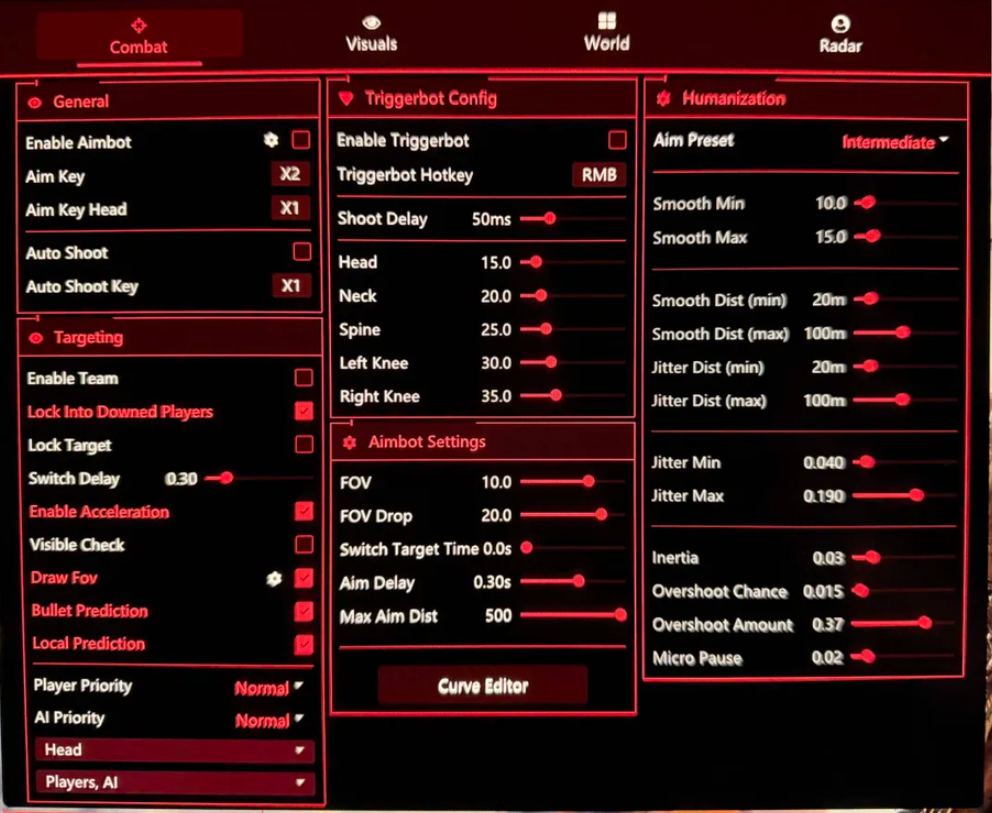
Tune aim keys, target locking, triggerbot, prediction, FOV, aim delay, max distance, curve behavior, and humanized smoothing.
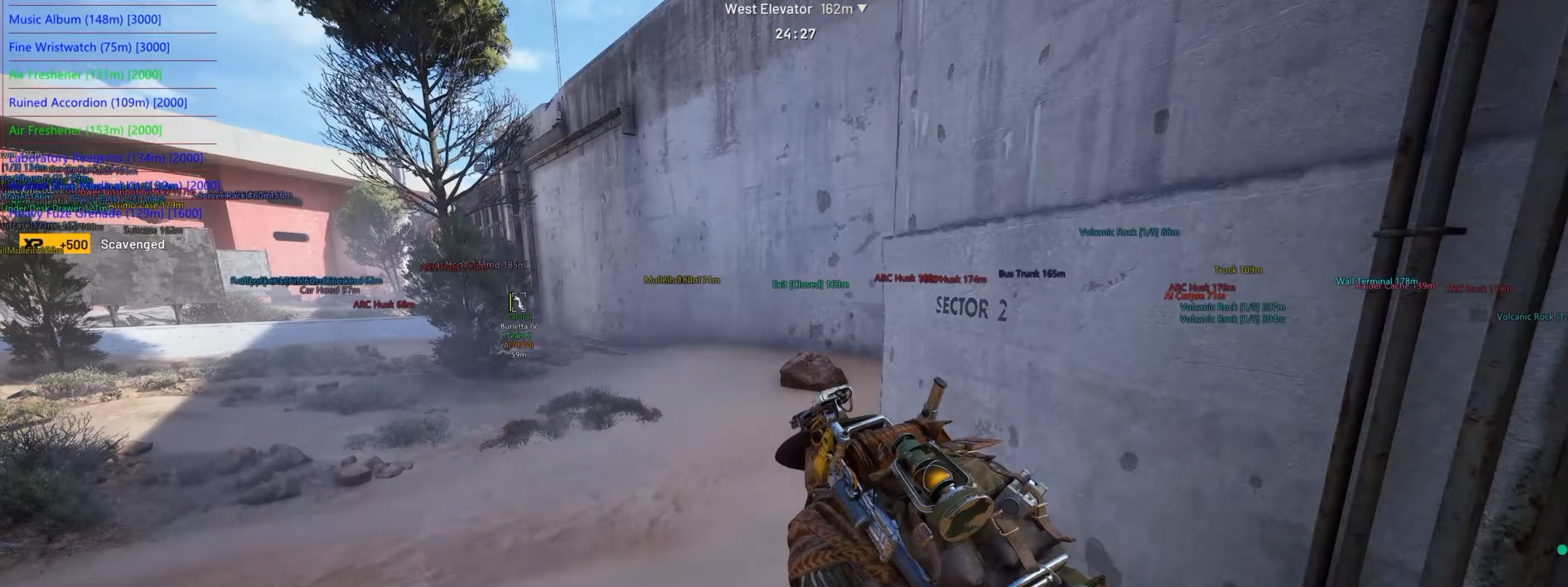
Visual Awareness
Read players and AI with boxes, health, shield, skeletons, weapons, team ID, downed players, aim direction, snaplines, and distance.
World Filters
Focus on high-value items with world toggles, max distance, and filter mode so loot routes stay useful without flooding the screen.
Radar Options
Use radar, HUD radar, position controls, visual options, colors, and entity colors to keep nearby pressure easier to understand.
Advanced Play Mechanics
Dive deep into the mechanics of our software to understand exactly why we dominate the market.
Arc Raiders cheats built for extraction pressure — fights, loot, and clean exits
Arc Raiders aimbot, ESP, world filters, and radar from GS23 are designed around how extraction shooters actually play — not just winning duels, but surviving AI pressure, reading player threats, identifying high-value loot fast, and leaving before the raid turns against you. The full feature set covers a deeply tunable aimbot with humanization, triggerbot with bone precision, player and AI visuals, high-value item filtering, and radar with entity color control. Runs on Windows 10 and Windows 11, supports Intel and AMD CPUs, and covers Steam, Epic, Windowed, and Borderless modes.
Arc Raiders hacks work best when they reduce uncertainty across the full raid loop — not just the moment a player crosses your crosshair. The GS23 product gives you the combat control, threat awareness, and loot intelligence to make faster decisions with less risk of being caught off-guard.
Aimbot: deep tuning with humanization built in
The GS23 Arc Raiders aimbot goes beyond standard FOV-and-smooth settings. The Combat section includes aim key, head aim key, auto shoot, lock target, switch delay, player priority, AI priority, visible check, draw FOV, bullet prediction, local prediction, FOV, FOV drop, switch target time, aim delay, max aim distance, and a curve editor. The humanization layer adds smooth min and max, smooth distance, jitter distance, jitter min and max, inertia, overshoot chance, overshoot amount, and micro pause.
FOV, delay, and prediction
Draw FOV shows you the active aim zone while tuning — essential when you're adjusting for different fight ranges. Narrow FOV keeps assistance tight to your natural crosshair position, which reads as deliberate aiming rather than assistance. FOV drop lets the cone tighten automatically when you ADS. Aim delay and switch target time smooth out target changes in multi-enemy angles. Max aim distance keeps the aimbot focused on fights within realistic range rather than snapping at threats you can't meaningfully engage. Bullet prediction and local prediction account for targets moving through Arc Raiders' open terrain and corridors.
Humanization: the layer that matters most
Humanization settings are what separate the GS23 Arc Raiders aimbot from a basic snap-lock setup. Smooth min and max define the range of aim travel speed, creating natural variance rather than robotic consistency. Jitter distance, jitter min, and jitter max introduce subtle micro-movement that mimics real hand behavior. Inertia adds weight to aim transitions. Overshoot chance and overshoot amount simulate the slight overcorrection a real player makes at range. Micro pause inserts brief hesitations that break up the mechanical rhythm. Together, these settings produce aim behavior that holds up under scrutiny across a full session — not just in the first few minutes.
Priority, lock target, and curve editor
Player priority and AI priority let you decide what the aimbot cares about first when multiple threats are visible — critical in Arc Raiders where AI and players often share the same space. Lock target keeps tracking committed once a target is acquired, useful in doorway swings and close pushes. The curve editor shapes aim acceleration behavior across the FOV zone rather than locking you to a linear response. These are finishing-touch settings; establish the base feel first, then use these to personalize.
Triggerbot: bone precision for tight extraction windows
The Arc Raiders triggerbot fires when your crosshair is on target, with hotkey control, shoot delay, and bone precision across head, neck, spine, left knee, and right knee. Extraction shooters create very short fight windows — a player peeking cover, crossing a loot room, or rushing an extract point — and triggerbot support is most valuable in exactly those moments.
- Bone precision keeps trigger behavior anchored to the zones you've selected, not any pixel of a target model.
- Shoot delay makes the response read as intentional rather than instant — more natural, less flagged.
- Hotkey control keeps the feature deliberate; always-on behavior on longer-range weapons is a recognizable pattern.
- Head aim key gives you a second aim binding dedicated to headshot-focused bone targeting when the situation calls for it.
Player ESP: full picture before the fight starts
GS23 Arc Raiders player visuals cover box, visibility check, health, shield, skeleton, skeleton thickness, name, weapons, team ID, downed players, aim direction, snaplines, and distance. In an extraction shooter, the best fights are the ones you avoid or enter on your own terms — and that requires knowing what you're walking into before you cross the threshold.
Box, health, shield, and skeleton
Player box places enemies in space before they're visible. Health and shield reads tell you instantly whether a target is fresh, pre-damaged, or already breaking — the difference between a clean trade and a bad push. Skeleton shows posture and movement direction: a prone player behind cover behaves differently than one sprinting to extract. Skeleton thickness lets you scale visibility to match how busy the scene is.
Weapons, distance, aim direction, and snaplines
Show weapons is underrated in Arc Raiders — a player carrying a DMR on a long sightline is a different threat than one with a shotgun in a loot building. Distance keeps threat assessment calibrated to what's immediately relevant. Aim direction shows where an enemy is looking, which tells you whether you have the angle before you commit. Snaplines give directional reference across wide areas. Team ID and downed player display round out the picture for coordinated play and post-fight reads.
AI visuals: separating Arc threats from player pressure
Arc Raiders' AI are not background noise — they create real pressure that pushes players into the open, drains resources, and reveals positions at the worst times. The GS23 AI visual options include box, threat level, visibility check, name, distance, and snaplines, giving you a separate read on AI that doesn't get buried inside player ESP.
- Threat level tells you how dangerous an AI target is before you engage or route around it.
- Distance and snaplines help you judge whether AI pressure is close enough to affect your current move.
- Visibility check keeps the AI overlay focused on threats in actual line of sight rather than every robot on the map.
- Separating AI and player visuals prevents the two from blending into a single confusing layer.
World filters: loot intelligence for smarter routes
The World section — enable/disable, max distance, high-value items, and filter mode — is what elevates Arc Raiders cheats beyond pure combat tools. Extraction game value lives in loot routing, and the ability to filter for high-value items at a tunable max distance means you move with intention rather than checking every crate on the map.
- High-value item filtering surfaces what's worth detouring for and ignores everything else.
- Max distance keeps item labels scoped to your current route — a valuable item across the map isn't always worth the exposure.
- Filter mode lets you switch between a broad loot sweep and a tight value-only view depending on how the raid is going.
- Pairing world filters with player and AI ESP gives you a complete picture: where the threats are, where the value is, and whether the path between them is safe.
Radar: constant awareness without screen clutter
The Radar section includes radar, HUD radar, position controls, visual options, colors, and entity colors. In Arc Raiders, where threats come from multiple directions and the map is rarely quiet, radar gives you a background awareness layer that doesn't require shifting your camera to check.
- HUD radar keeps the display passive — a corner read you glance at rather than stare at.
- Position controls keep the radar out of gameplay-critical screen space.
- Entity colors let you visually separate players, AI, and loot on the same display so nothing blurs together.
- Keep the radar footprint small; a large radar pulls attention away from the main view and defeats the purpose.
Setup guide: starting points for extraction play
- Aimbot FOV: 3–5 degrees — tight enough to feel controlled, wide enough for close-quarters extraction fights.
- Smooth min/max: start at moderate values; push smooth max up until the aim feels human, not mechanical.
- Jitter and overshoot: light values only — enough to add variance without making tracking feel unstable.
- Micro pause: on; even small hesitations break the mechanical rhythm that stands out on killcams.
- Bullet prediction: on by default; Arc Raiders targets move constantly through loot rooms and corridors.
- Player ESP max distance: 100–150m for tight raid awareness; wider only if holding open outdoor zones.
- AI visuals: threat level and distance on, snaplines optional — enough to route around AI without noise.
- World filter max distance: match to your intended loot radius, not max map range.
- Triggerbot: hotkey only, shoot delay 60–80ms, bone precision focused on center-mass targets.
- Save separate configs for solo and squad raids.
Solo raids vs squad raids
- Solo: quiet setup — tight player ESP, AI threat level and distance only, world filters on high-value at close range, radar small. Every label should earn its place. Information overload kills faster than players do in solo runs.
- Squad: broader player and AI ESP, team ID on, aim direction and snaplines for callout support, wider radar with entity colors to separate roles. Information can be shared — don't need every person running max-range ESP when callouts cover the gaps.
- Loot-focused runs: world filters primary, combat settings conservative, AI visuals on to avoid engagement, player ESP at medium distance as a warning rather than a targeting layer.
- Combat-heavy runs: player ESP full, AI priority balanced against player priority, triggerbot active, world filters reduced so loot labels don't compete with threat information.
Risk management and safety
Extraction shooters have a natural cover for conservative settings — cautious play is expected, and deliberate aiming doesn't stand out the way it might in a twitchy arena shooter. Use that. Keep FOV tight, humanization active, and triggerbot on a hotkey with delay. The humanization layer exists specifically to make the aimbot hold up over time — don't bypass it by maxing FOV and zeroing delay.
- Humanization off with high FOV is the combination most likely to look wrong on a killcam or replay — don't run it that way.
- Always-on triggerbot with no shoot delay on semi-auto weapons is recognizable behavior; keep it keyed.
- Visible check on at all times — reducing output to what's in line of sight keeps behavior believable.
- Update after patches — anti-cheat updates and new seasons affect detection status.
Further reading
Check the GS23 Arc Raiders product page for current pricing, stock, and compatibility. Browse the full Arc Raiders cheats category or start from the GS23 homepage. For game background, see Arc Raiders on Wikipedia or the official Arc Raiders site.
Trusted by Thousands.
See what our community has to say about their experience using our premium software architecture.

Switched to their DMA setup last month and haven't looked back. The 1 PC to 2 PC transition was completely seamless thanks to the support team. 100% undetected since day one.
Ai aim assist 10/10 works, support guy was very helpful
V9 Ai aim on ps5 wtf lock very good
I try to buy from many store before And The only store you can trust is GS23 Services 👑
Switched to their DMA setup last month and haven't looked back. The 1 PC to 2 PC transition was completely seamless thanks to the support team. 100% undetected since day one.
Ai aim assist 10/10 works, support guy was very helpful
V9 Ai aim on ps5 wtf lock very good
I try to buy from many store before And The only store you can trust is GS23 Services 👑