Escape from Tarkov Cheats — Full ESP, Item Radar & Aimbot
Player ESP with skeleton, health, and weapon data. Complete item radar for keys, quest items, gear, and ammo. Aimbot with bone selection and bullet velocity. Infinite stamina, no recoil, thermal vision — undetected on Windows 10 and 11.
Escape from Tarkov
Premium Undetected Escape from Tarkov Hacks
Engineered to Win.
Precision coded for maximum performance. Our features are designed from the ground up to give you an undeniable mechanical advantage while maintaining absolute security.
Player ESP & Extraction Radar
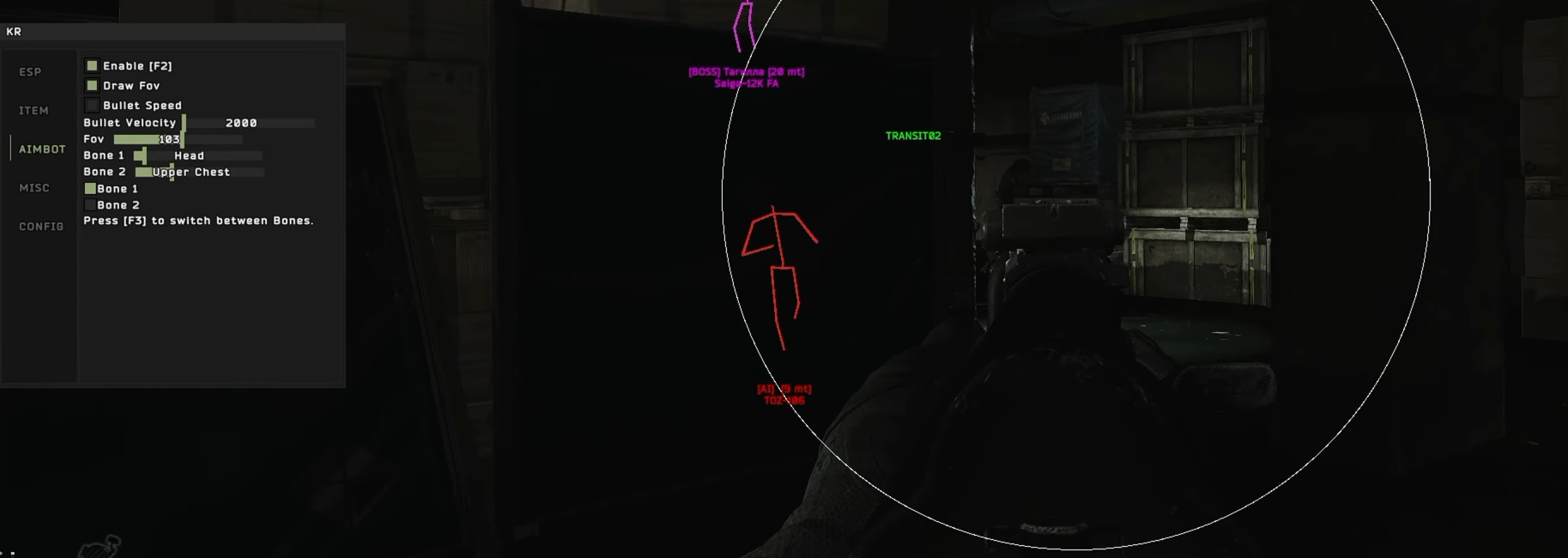
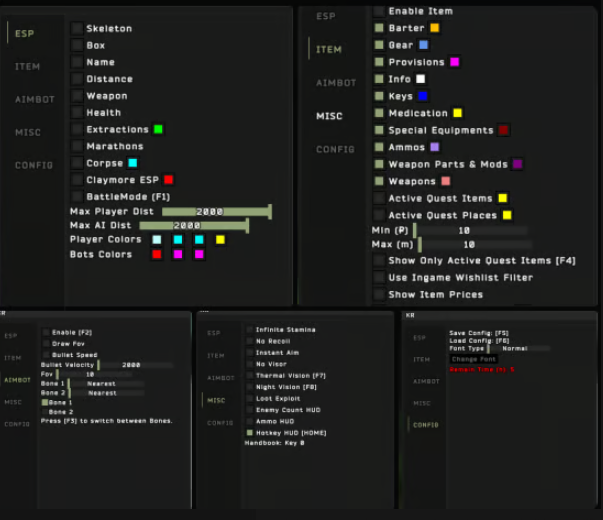
Skeleton and box rendering through walls, health bars, weapon identification, distance display, AI filtering, team color coding, claymore detection, and extraction point overlay.
Item ESP & Loot Intelligence
Full item radar across every loot category: keys, quest items, barter items, gear, weapons, ammo, weapon parts, with flea market pricing and quest-active filtering.
Aimbot & Combat Precision
Bone selection between head and upper chest, bullet velocity compensation for range accuracy, adjustable FOV circle, and F2 aim toggle for switching on and off mid-raid.
Stamina, Vision & Survival Tools
Infinite stamina, no recoil, instant aim, no visor, thermal and night vision without equipment, loot exploit, enemy count HUD, ammo HUD, and config save/load.
Advanced Play Mechanics
Dive deep into the mechanics of our software to understand exactly why we dominate the market.
Escape from Tarkov cheats: full ESP, item radar, aimbot, and survival tools for every raid
Escape from Tarkov cheats from GS23 cover every advantage you can extract from a raid — player ESP with skeleton rendering, health bars, weapon identification, and extraction point overlays; comprehensive item ESP across every loot category including keys, quest items, weapon modifications, and barter gear with flea market pricing; aimbot with bone selection and bullet velocity compensation; and a full suite of survival tools including infinite stamina, no recoil, instant aim, thermal and night vision, no visor, loot exploit, enemy count HUD, and claymore detection. Undetected on Windows 10 and 11, Intel and AMD, Steam and game launcher, Windowed and Borderless.
EFT buyers are motivated by one thing more than in any other game: the cost of dying. Every raid puts your equipped gear at risk. A PMC with a kitted M4, night vision, and armor runs into a player who knew exactly where they were standing — and loses everything. The gap between knowing and not knowing is the gap between winning a raid and watching your kit walk away in someone else's hands. Player ESP and aimbot close that gap completely.
Player ESP: see every PMC and Scav before they see you
Player ESP in EFT is the most consequential advantage in any extraction shooter because the game is built entirely around information asymmetry — the player who spots first shoots first, and shooting first in Tarkov almost always wins the fight outright.
Skeleton and box rendering
Skeleton ESP renders the full bone structure of every player and AI through walls and terrain, giving you precise positional data regardless of cover. Box ESP draws a bounding box around targets — useful in cluttered environments where bone rendering creates visual noise. Toggle between modes or run both simultaneously depending on map density and target count.
Health, weapon, and distance data
Health indicator overlays show remaining HP on each tracked target — essential for deciding whether to push a wounded PMC or let them bleed out and take the fight at a safer angle. Weapon identification tags show what each player is carrying, letting you assess threat level before engagement: a player with a Mosin is a different calculation than one with an M1A or a suppressed MP5K. Distance display tells you exactly how far each target is — critical for range-appropriate engagement decisions and for avoiding fights at distances where your loadout underperforms.
AI distance filtering and team color coding
Max Player Dist and Max AI Dist sliders (default 2000) control how far out ESP renders PMCs versus AI Scavs respectively, keeping your display clean at ranges where targets are not yet actionable. Player Colors and Bots Colors assign different visual identifiers per player type — making it immediately clear whether a target is a hostile PMC, a Player Scav, or an AI, and whether they are in your party or hostile. BattleMode (F1) adjusts display behavior for active combat versus exploration and looting phases.
Extraction point overlay and marathon tracking
Extraction point ESP displays all available extractions on the map in real time, including conditional extractions requiring payment or specific conditions. In a losing fight, knowing your extraction options without pulling up the in-game map — which costs you situational awareness at the worst possible moment — is a raid-saving advantage. Marathon tracking assists with longer patrol routes and route planning across large maps like Woods, Shoreline, and Customs.
Item ESP: complete loot intelligence across every map
EFT's loot system is one of the most complex in gaming — thousands of items across hundreds of containers, spawn weights that change per map and per patch, and a flea market that prices individual items in real time. Item ESP removes the need to memorize spawn tables or check every container.
Keys, quest items, and barter items
Keys are among the highest-value single items in EFT — the right key opens a room worth hundreds of thousands of roubles in contained loot. Quest items are time-critical: finding specific items for active Trader quests in one raid versus running ten is the difference item ESP makes directly. Barter items — specific goods required for Trader exchanges that unlock key gear tiers — are highlighted separately so you can route toward them without stopping at every container along the way.
Gear, weapons, ammo, and weapon modifications
Full gear ESP covers armor, helmets, and backpacks — letting you identify high-value pickups without opening every container manually. Weapon ESP highlights full firearms on the ground or in weapon racks. Ammo type display identifies available calibres before you loot, relevant when you are running low on specific rounds mid-raid. Weapon Parts and Mods highlights suppressors, scopes, handguards, and stocks — individually valuable items that are easy to overlook in fast container sweeps under pressure.
Quest tracking, wishlist filter, and price overlay
Active Quest Items ESP and Active Quest Places ESP limit displayed markers to items and locations relevant to your currently active Trader quests, cutting through visual noise to show only what matters for progression. Use Ingame Wishlist Filter applies your in-game wishlist as the item filter baseline — only highlights items you have already marked as wanted. Show Item Prices overlays flea market value on all tagged items, giving you instant auction data without alt-tabbing out of the raid. Min and Max distance filters (default 10m) control how far out item markers appear — tighten to focus on your immediate area, widen to plan routes toward specific targets.
Aimbot: precision combat in a game where every shot costs gear
EFT's health system is granular — limb damage, bleeds, fractures, and specific penetration thresholds per armor tier mean that where you hit matters as much as whether you hit. The aimbot is configured with this in mind.
Bone selection and switch
Bone 1 and Bone 2 let you assign a primary and secondary target bone — Head and Upper Chest are the defaults. Head shots in EFT are frequently one-shot kills against helmeted opponents when penetration exceeds the faceshield value; upper chest hits register on the thorax, the highest HP body part, typically requiring three to five hits depending on armor class and calibre. Press F3 to switch between bones mid-engagement — essential when a target in prone position does not expose their head hitbox and requires a switch to upper chest to land shots.
Bullet velocity compensation
EFT models bullet travel time and drop — at range, shots need to lead moving targets and compensate for drop based on ammunition type. Bullet Velocity (default 2000 m/s) and Bullet Speed settings feed into the aimbot's lead calculation. Match these to your actual ammunition velocity for accurate compensation at range. This is most noticeable beyond 100m and is critical when using lower-velocity subsonic or pistol-calibre ammunition.
FOV circle and aim toggle
Draw FOV renders the aimbot acquisition circle on screen — a visible indicator of the cone within which the aimbot engages targets. FOV (default 103) controls the radius of this circle. Aim Toggle (Enable [F2]) lets you switch the aimbot on and off without exiting the menu, useful for managing engagement decisions during complex fights with multiple targets at different distances or ranges.
Survival and utility tools
- Infinite Stamina: eliminates the stamina bar entirely. In EFT, extended sprinting while over-encumbered produces heavy breathing that impacts aim. Infinite stamina means full sprint through any situation, no movement penalties, and clean hands regardless of how long you have been running.
- No Recoil: removes weapon recoil completely. EFT recoil is among the most punishing in any shooter — full-auto fire above 100m is genuinely difficult without control mods and skill levels. No Recoil makes every weapon accurate at all distances in full-auto.
- Instant Aim: eliminates the ADS animation delay. EFT ADS speed depends on weapon weight, ergonomics, and character skill level — Instant Aim skips the delay entirely for immediate accuracy from the moment you raise the weapon.
- No Visor: removes helmet visor rendering that reduces field of view and creates edge distortion with certain tier-4 and tier-5 helmet types.
- Thermal Vision [F7] and Night Vision [F8]: enable thermal and night vision overlays independently of whether you have the physical items equipped. Night vision raids without the headset. Thermal vision without the expensive scope. Both modes are toggled with hotkeys without entering the cheat menu.
- Loot Exploit: accelerates container interaction beyond normal animation times — faster looting per container means faster raid cycles and reduced exposure time while stationary over open containers.
- Claymore ESP: highlights planted claymores and tripwires placed by other players. These traps are invisible without this overlay and are a consistent source of raid-ending kills near extraction points and high-traffic corridors.
- Enemy Count HUD and Ammo HUD: persistent overlay displays showing active enemy count in the raid and current ammunition remaining across all loaded weapons without opening inventory.
Configuration management
The Config (KR) tab provides full session management: Save Config [F5] and Load Config [F6] store and recall complete settings profiles across ESP visibility toggles, aimbot bone assignments, MISC tool states, and distance filters. Font Type and size controls adjust overlay readability in different map lighting conditions. Refresh Time (default 5 seconds) controls how frequently ESP data updates — lower values produce more responsive overlays at higher system performance cost.
Risk management in Tarkov's high-stakes environment
EFT runs Battlestate Games anti-cheat alongside BattlEye. Detection in Tarkov tends toward ban waves rather than real-time flags — periods of apparent safety followed by mass bans across accounts using detected builds. Extremely obvious ESP behavior produces patterns that behavioral analysis can flag even without a signature match.
- Keep item ESP distance filters conservative — looting every high-value spawn in sequence across multiple raids in a way no normal player could know is a recognizable pattern in replay data.
- Do not kill every player you detect through walls. Use ESP for positioning and engagement timing, not as a kill radar that produces statistically impossible K/D ratios across many raids.
- Keep aimbot FOV tight. Wide FOV settings that snap across large angles produce obvious footage if an account is flagged for manual review.
- Run on a secondary account. Tarkov bans are permanent, gear is lost on ban — if your main account and wipe progress matter, protect them by keeping cheat use on a separate account.
- Update immediately after game patches. EFT patches frequently and anti-cheat signatures can change with each client update independent of content patches.
Further reading
Check the GS23 Escape from Tarkov product page for current pricing and stock. Browse the full Escape from Tarkov category or start from the GS23 homepage. For game background, see Escape from Tarkov on Wikipedia or the official EFT site.
Trusted by Thousands.
See what our community has to say about their experience using our premium software architecture.

Switched to their DMA setup last month and haven't looked back. The 1 PC to 2 PC transition was completely seamless thanks to the support team. 100% undetected since day one.
Ai aim assist 10/10 works, support guy was very helpful
V9 Ai aim on ps5 wtf lock very good
I try to buy from many store before And The only store you can trust is GS23 Services 👑
Switched to their DMA setup last month and haven't looked back. The 1 PC to 2 PC transition was completely seamless thanks to the support team. 100% undetected since day one.
Ai aim assist 10/10 works, support guy was very helpful
V9 Ai aim on ps5 wtf lock very good
I try to buy from many store before And The only store you can trust is GS23 Services 👑